How to adapt one key visual to every Meta and Google Ads format
Updated November 2026 · PixFit team
Map the placements first, then adapt the approved key visual in a single pass. Four ratios cover both platforms: 4:5 and 9:16 for Meta at 1440 px wide, plus 1.91:1, 1:1, 4:5 and 9:16 for Google. Recompose each size, compare it side by side with the key visual, then build three versions per ratio with Iterate.
The key visual took two weeks of rounds to approve. Now it has to run in Feed, Stories, Reels, Demand Gen and Performance Max, each with its own size and its own interface on top, and every version has to say exactly what the approved one says.
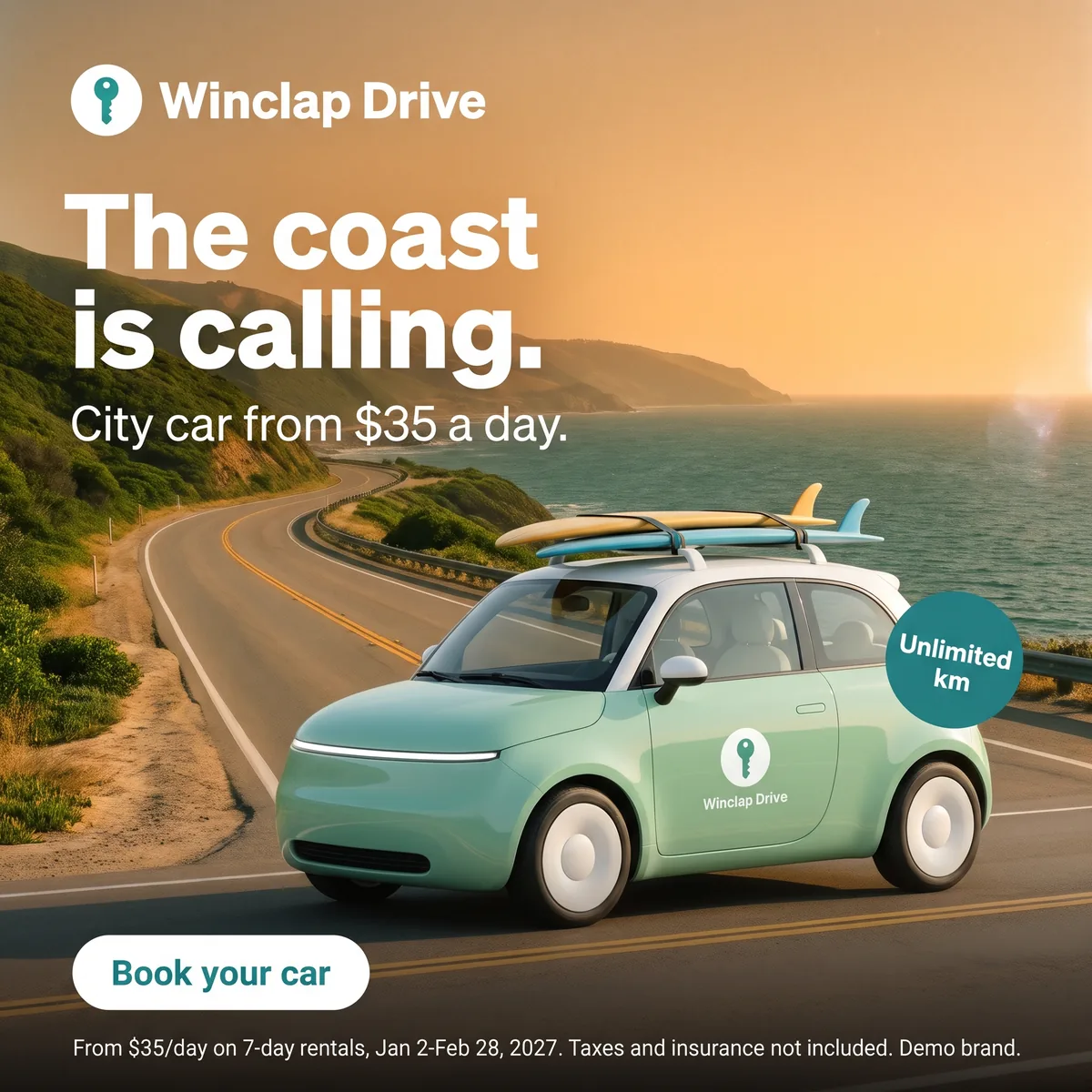 Key visual · 2048 × 2048
 Meta 4:5 · 1200 × 1500
 Meta 9:16 · 1080 × 1920
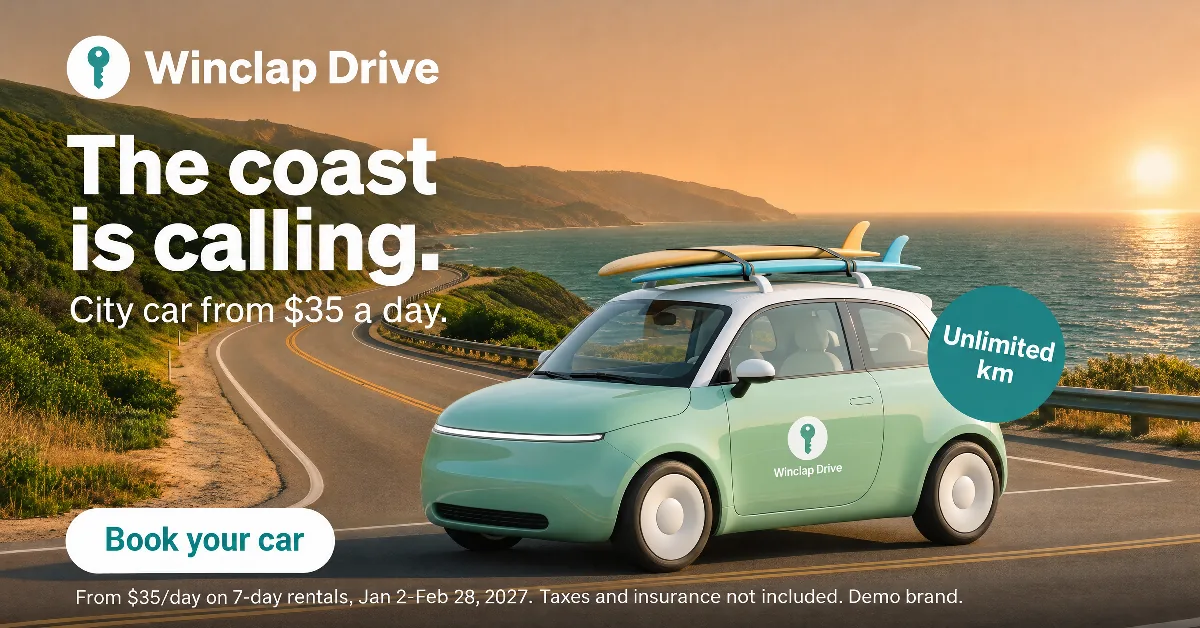 Google 1.91:1 · 1200 × 628 · custom size
 Google 1:1 · 1080 × 1080
 Google 4:5 · 1080 × 1350
 Google 9:16 · 1080 × 1920
One key visual on Meta and Google: official sizes and the nearest PixFit preset (November 2026)
| Placement | Ratio | Official recommended size | Nearest PixFit preset |
|---|---|---|---|
| Meta Feed (Facebook and Instagram) | 4:5 | 1440 × 1800 | Meta 4:5 at 1200 × 1500, above Meta's minimum; type 1440 × 1800 as a custom size for the exact figure |
| Meta Stories and Reels | 9:16 | 1440 × 2560, with about 14% top, 35% bottom and 6% per side free of text and logos | Meta 9:16 at 1080 × 1920; 1440 × 2560 as a custom size |
| Google Demand Gen, Performance Max and Responsive Display | 1.91:1 | 1200 × 628 (minimum 600 × 314) | No preset: add 1200 × 628 as a custom size in the same run |
| Google Demand Gen, Performance Max and Responsive Display | 1:1 | 1200 × 1200 (minimum 300 × 300) | Google 1:1 at 1080 × 1080, or 1200 × 1200 as a custom size |
| Google Demand Gen and Performance Max | 4:5 | 960 × 1200 (minimum 480 × 600) | Google 4:5 at 1080 × 1350 |
| Google Demand Gen (recommended for YouTube Shorts) | 9:16 | 1080 × 1920 (minimum 600 × 1067) | Google 9:16 at 1080 × 1920 |
Read on 6 November 2026. Performance Max lists no 9:16 image. Demand Gen asks advertisers to upload 3 images of each aspect orientation for maximum placement coverage. Logos are uploaded as a separate asset.
Sources
- Meta Ads Guide: Facebook Feed image, accessed 2026-11-06
- Meta Ads Guide: Instagram Stories image, accessed 2026-11-06
- Google Ads Help: Demand Gen image specs, accessed 2026-11-06
- Google Ads Help: Performance Max asset specs, accessed 2026-11-06
- Google Ads Help: Responsive Display ads, accessed 2026-11-06
Start with the matrix, not with the first size
Adapting one size at a time means finding each placement's problem after the previous one already shipped. Before you open the file, list every placement the media plan buys. For Meta and Google that is four ratios: 1.91:1, 1:1, 4:5 and 9:16. Meta now recommends 1440 px widths, while many guides still list 1080. PixFit's presets sit above Meta's minimums, and the custom size field takes the exact recommended figure when you want it.
The order of work
- Lock the key visual: final headline, offer, price, logo, CTA and legal line, approved and exported flat as PNG, JPG or WebP.
- Run every size in one batch: the Meta and Google presets plus 1200 × 628 as a custom size, since there is no 1.91:1 preset.
- Review the hardest ratios first: 9:16, where the interface covers the top and the bottom, and 1.91:1, where the headline has the least height. Then 4:5 and 1:1.
- Version last. Once every ratio reads, Iterate builds the market, price and product versions on the same layout.
Side-by-side QA against the key visual
Put each output next to the approved piece, not next to the other outputs. When you compare adaptations with each other, the same error repeats and stops looking like one.
- Same offer, same figures, same legal line, word for word.
- Logo with its clear space, away from the profile bar and the buttons.
- Headline and CTA outside the zones the safe-zone overlay marks.
- File weight inside each platform's limit: 30 MB on Meta, 5 MB per image on Google.
- Anything off gets a final touch inside PixFit with AI fixes, then a second look.
Three versions per ratio, without rebuilding anything
Google's Demand Gen help asks for 3 images of each aspect orientation. From one key visual that means versions, not new designs: a different product, price, market or CTA on the same layout. Six sizes in three versions each is 18 outputs, and at 1 credit per output that fits inside the 25 monthly credits of the Core plan.
- Upload the approved key visual to PixFit as a PNG, JPG or WebP.
- Select the Meta and Google presets, and add 1200 × 628 as a custom size for Google's landscape image.
- Compare each output with the key visual and the safe-zone overlay, finish details with AI fixes, and send the set to Iterate for versions.
How PixFit adapts one key visual
- 1
Upload the approved key visual (PNG, JPG or WebP).
- 2
Pick the formats: 14 presets plus any custom size.
- 3
Review each output with the safe-zone overlay, finish any detail with AI fixes and download it ready for paid media.
Frequently asked questions
What a designer spends 2 days on takes PixFit under 3 minutes.
Plans from $49/mo. Start with 5 free credits, no card.
See pricing